Some smart glasses can answer spoken questions, but the answer depends on the exact model, paired phone, software and region. Audio-only Bluetooth glasses that play music and handle calls are not automatically AI assistants. Camera-equipped AI glasses may answer general questions and, when supported, use an image of what you are viewing to address a visual question. A display is a separate feature: glasses can speak an answer without putting words in your field of view. The distinction matters because product names often use “smart” for very different hardware.
First identify what kind of answer you need
A basic voice assistant question such as “What time is sunset?” needs a microphone, speakers, compatible assistant software and usually a phone or network path. A question such as “What does this sign say?” additionally needs a camera or another way to pass visual information to the assistant. A question about a private document may require access to data the glasses do not have. The best way to evaluate any promise is to write down a real question and trace the input, processing and output steps that would answer it.
Ray-Ban’s official Meta glasses FAQ describes both general voice questions and supported questions about what the wearer sees. It says the latter use a photo sent to Meta’s cloud for processing and an audio answer returned to the glasses. Meta’s product announcement also describes follow-up questions. These are examples for Meta’s supported models and software, not a specification for every camera-glasses product or every country.
| Question | Minimum useful capability | What to verify |
|---|---|---|
| “What’s the weather?” | Assistant access, audio input/output and network path | Assistant availability in the user’s region and language |
| “What does this printed sign say?” | Camera, visual-processing feature and supported language | Image capture, privacy controls and actual OCR/translation support |
| “What battery level remains?” | Device-status integration | Whether the companion app exposes that status by voice |
| “Read my confidential email” | Account integration and permission | Whether access exists and whether sharing is acceptable |
| “Show the answer in my lens” | In-lens display as well as assistant software | Actual display hardware; speakers alone cannot show text |
Voice answer versus visual question
General questions
On a supported system, you speak a wake phrase or activate the assistant, ask a question, and hear a reply through the frame’s speakers. This is useful when your hands are busy but your attention should remain on the surroundings. It does not mean the glasses know everything around you. Without a camera request, a location signal, or other authorized context, the system has no direct evidence of what you are looking at. Even a fluent answer can be wrong or out of date, so verify important facts with the underlying source.
Questions about what you see
Visual questions are a different workflow. A supported camera-equipped model captures an image or video context, sends relevant data for processing, and returns a response. Ray-Ban’s FAQ gives examples such as translating a sign or identifying a plant. The same FAQ explains that captured material is sent to Meta’s cloud when this function is used, with retention and improvement practices governed by Meta’s policies. Read the current app settings and privacy notice before enabling it. Do not assume local-only processing, and ask permission before recording other people where appropriate.
Visual AI can misread small text, poor lighting, unusual objects or missing context. A sign translated into plausible English may still be wrong; a plant identification is not a basis for deciding whether something is safe to eat. For medical, legal, financial or safety decisions, use a qualified source. This limitation is not unique to glasses: the convenience of a hands-free question does not improve the underlying reliability of the model or the quality of the image.
Does an in-lens screen change the answer?
A display can show text, directions or other visual feedback, but it is not required for a spoken response. Conversely, a display without a capable assistant cannot invent a good answer. Meta’s Ray-Ban Display announcement describes a specific display-equipped product distinct from audio-first AI glasses. The point is not to treat one brand’s lineup as universal, but to separate three procurement questions: can the device hear a question, can it obtain the necessary context, and can it present the answer in the form you want?
| Listing phrase | Reasonable initial inference | Evidence still needed |
|---|---|---|
| Bluetooth audio glasses | Music or call audio may be supported | Named voice assistant, commands, regions and app compatibility |
| Camera smart glasses | A camera is present | Whether photos can be used for AI questions at all |
| AI glasses | Some marketed assistant function is intended | Exact models, features, privacy path and availability |
| AR or display glasses | May put visuals in the wearer’s view | Actual display type and independent question-answering support |
How to check a product claim before buying
Ask the seller to demonstrate your exact question on the exact hardware and current app version. For voice questions, confirm the supported wake phrase, phone operating system, supported language, network requirements and whether the answer comes from a named assistant or a phone app. For visual questions, check that the model has a camera and a documented visual-query function, not merely photo capture. For work use, ask where images and transcripts go, who can access them, whether they are stored, and how deletion works. For a display request, ask to see the answer in the lens instead of accepting a video of a separate phone screen.
A demo should include failure cases. Try an ordinary general question, a follow-up question, and a visual question in low but safe light. Ask for the source of a factual answer. Disable the network or place the paired phone out of range to learn what still works, without assuming that all glasses behave alike. If a seller cannot demonstrate the core capability, record it as unverified instead of promising that a later update will add it.
How our own listings fit this question
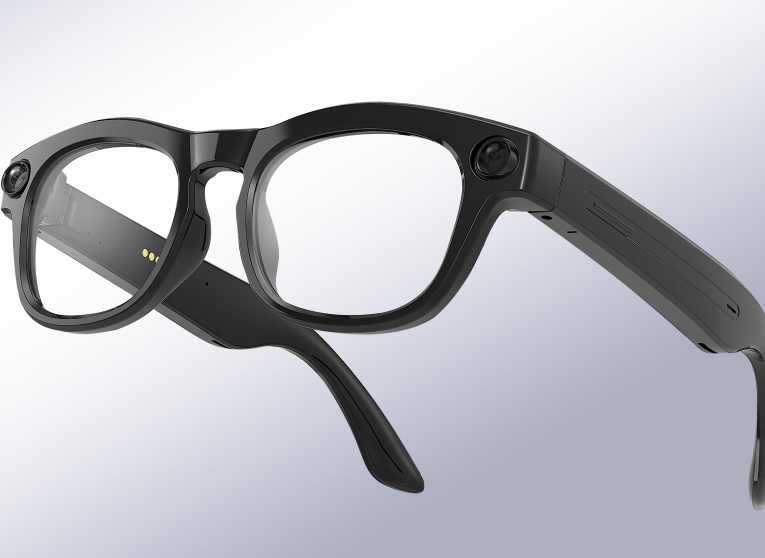
Our YJ-AR002 camera smart glasses listing is relevant to the camera part of the discussion. The product picture shows cameras, but the image is not proof that the model can answer questions about a scene, identify objects or use a particular cloud assistant. Request the current manual and a live demonstration for those functions. Our YJ005-A04 transparent music eyewear is an example of an audio-oriented listing. Its music/eyewear positioning does not establish generative AI or camera-based questions. We include these links so a reader can compare hardware categories, not as endorsements of undocumented assistant functions.
This distinction also helps avoid buying the wrong type of frame. If hands-free calls and music are the real needs, a comfortable audio design may be enough. If you need sign translation through a camera, look for a documented visual feature. If you need private, offline processing, verify that explicitly; do not infer it from a local-looking app interface. If you need a visual overlay, confirm the actual display and whether it fits your prescription and viewing conditions.
Privacy and safety are part of usefulness
Camera questions can include bystanders, screens, documents and locations in the captured image. Meta’s responsible-innovation guidance advises asking permission from people around you before capturing photos or video. The same principle applies to any camera eyewear even when a local law differs. Use the camera only where allowed, avoid confidential material without authorization, and check how the app stores or shares requests. A device that can answer a question is not necessarily appropriate for every situation in which you could ask it.
Do not rely on audio answers while crossing traffic, operating machinery or doing a task requiring full attention. For navigation, confirm route details on a trusted map and keep your eyes on the environment. For accessibility, evaluate the specific product with the intended user; a feature demo is not a guarantee that speech recognition, microphone placement, volume or control gestures will work for everyone.
Practical answer
Yes, some smart glasses answer spoken questions; some supported camera models can also answer questions about what they see. But “smart glasses” is not a common capability standard. Verify the exact model, supported software, country, language, privacy behavior and output format. Treat a camera, a microphone, an AI label and a display as separate pieces of evidence. Ask for a demonstration of the question you actually care about and do not promote an undocumented feature as though it were tested.
Sources and scope
Primary references: Ray-Ban Meta product FAQ, Meta’s assistant-feature announcement, Meta’s display-model announcement, and Meta’s camera-use guidance. Features, language support and regional availability can change; confirm them in the current model documentation before publication. No firsthand test of the linked site products is claimed.