त्वरित उत्तर: Identify the exact glasses model and use its specified charging path. Some audio sunglasses accept a USB-C cable at the frame; others use a proprietary magnetic lead or a charging case. Charge the case separately if the maker says to. Do not assume a connector that fits is electrically or mechanically correct. If charging does not start, check the case battery, alignment, dry contacts, cable and adapter before attempting any reset.
"स्मार्ट ग्लास" में बहुत अलग हार्डवेयर के साथ कई डिज़ाइन शामिल हैं। यही कारण है कि एक सार्वभौमिक चार्जिंग निर्देश अविश्वसनीय है। सबसे सुरक्षित शुरुआती बिंदु बॉक्स, मंदिर या मैनुअल पर मुद्रित मॉडल नंबर है। निर्माता के वर्तमान निर्देश सामान्य सलाह पर प्राथमिकता लेते हैं, विशेष रूप से एलईडी रंगों, अनुमत एडेप्टर और पानी के जोखिम के लिए। यह मार्गदर्शिका बताती है कि चार्जिंग विधि की पहचान कैसे करें, पुष्टि करें कि बिजली वास्तव में बह रही है और प्रत्येक जोड़ी को रे-बैन मेटा ग्लास के रूप में इलाज किए बिना सामान्य समस्याओं को संभालती है।
पहले पहचानें कि किस भाग को शक्ति प्राप्त होती है
तीन व्यापक व्यवस्थाएं हैं। प्रत्यक्ष USB-C फ्रेम में चश्मे पर एक पोर्ट होता है; एक चुंबकीय-संपर्क फ्रेम एक संरेखित केबल का उपयोग करता है; और एक केस-चार्ज फ्रेम एक फिट केस में संपर्कों के माध्यम से शक्ति प्राप्त करता है। एक मामला स्वयं USB-C के माध्यम से चार्ज हो सकता है जबकि चश्मे में कोई खुला USB पोर्ट नहीं है। रे-बैन का कहना है कि इसका मेटा ग्लास केवल मामले में चार्ज होता है, जबकि इसका मामला यूएसबी-सी से जुड़ता है। अंतर मायने रखता है: केस में केबल को प्लग करना वही ऑपरेशन नहीं है जो फ्रेम को चार्ज करता है।
| चार्जिंग डिज़ाइन | क्या पता लगाना है | Safe first check | सामान्य भूल |
|---|---|---|---|
| फ्रेम पर यूएसबी-सी | मंदिर या पुल पर बंदरगाह, जैसा कि मॉडल गाइड में पहचाना गया है | चेक पोर्ट ड्राई है और बिना बल के केबल सीटें | तेज चार्जिंग के प्रमाण के रूप में उच्च-शक्ति एडेप्टर का उपयोग करना |
| चुंबकीय नेतृत्व | मिलान संपर्क पैड और आपूर्ति की गई लीड | सत्यापित करें कि दोनों पिन संरेखित करें और संकेतक परिवर्तन | एक अलग पिन व्यवस्था के साथ नेत्रहीन समान लीड का उपयोग करना |
| चार्जिंग केस | चश्मा डॉकिंग संपर्क प्लस अलग केस इनपुट | केस बैटरी और सही बैठने की जाँच करें | यह मानते हुए कि मामले में शक्ति है क्योंकि इसकी एलईडी संक्षिप्त रोशनी है |
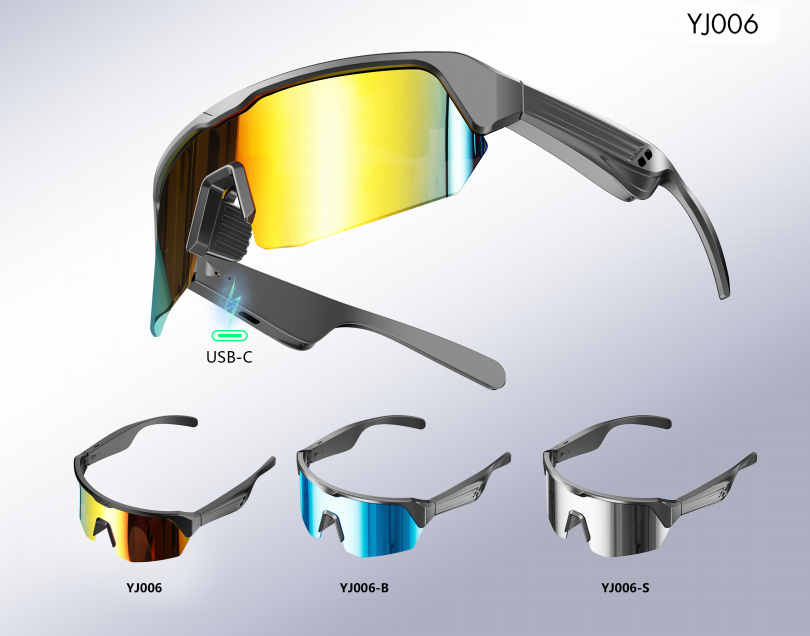
For a concrete comparison, the site lists YJ006 sport audio sunglasses with USB-C charging, while YJ005-A02 smart music sunglasses list magnetic charging. Those listings identify the advertised charging type; they do not establish compatibility between cables or prove a measured charge time. Confirm the accessory in the package before ordering a replacement. If the listing and the product label disagree, request the current manual and accessory part number from the seller.
एक सावधानीपूर्वक चार्जिंग अनुक्रम
1. Stop playback and inspect the glasses
Pause a call, recording or music session so you can see whether the device enters charging mode. Check for a bent port, damaged lead, swollen or distorted frame, moisture or debris. Do not connect a visibly damaged battery product. If the glasses have been in rain, follow their own water-exposure instructions before charging. A water-resistance marketing claim does not make wet charging contacts safe.
2. मॉडल के निर्दिष्ट एक्सेसरी का उपयोग करें
For direct USB-C charging, use a standards-compliant cable and a compatible charger that meets the maker’s input requirements. For magnetic charging, use the intended lead and let the magnets align naturally; never force a reversed contact. For a case, fold or position the temples exactly as instructed and make sure the charging points meet. Ray-Ban’s official help specifically describes seating its glasses on the nose-bridge connection inside the case. That is an example for those models, not a rule for all glasses.
3. संकेतक की जांच करें, फिर दोबारा जांचें
An LED can signal case battery level, glasses charging status, pairing or an error depending on what action triggered it. Do not infer “charging” from color alone. Look up the LED table for your exact generation and note whether the case is open, closed or plugged in. On supported models, the companion app may show a separate battery percentage for the glasses and case. A rising percentage after several minutes is better evidence of charging than a single light flash.
4. जब उत्पाद चार्ज किया जाता है तो बिजली हटा दें
Use the app or product indicator described by the maker. Charging time depends on battery state, input rating, temperature and charging design. A 30-watt wall adapter does not force a small pair of glasses to take 30 watts; the device controls its accepted input. Avoid promising an exact recharge time unless the manufacturer specifies it for the same model and method. When the device reports full, unplug the cable or remove the case from external power as directed in its instructions.
चार्जिंग विफल क्यों दिखाई दे सकती है
प्रतिवर्ती चेक से शुरू करें। एक मामला खाली हो सकता है, भले ही चश्मा ठीक से डॉक किया गया हो। एक USB-C केबल केवल-बिजली, रुक-रुक कर या क्षतिग्रस्त हो सकती है। एक मुड़े हुए मंदिर द्वारा चुंबकीय संपर्कों को गलत तरीके से संरेखित किया जा सकता है। एक अपरिचित मॉडल पर, लाल एलईडी का मतलब कम बैटरी, त्रुटि या चार्जिंग हो सकता है; अनुमान लगाने के बजाय मैनुअल से परामर्श करें। कंजर्वेटिव की सफाई करते रहें: बिजली को डिस्कनेक्ट करें पहले, एक नरम सूखे कपड़े का उपयोग करें जहां निर्माता अनुमति देता है और प्लेटेड पिन को स्क्रैप करने या पोर्ट में तरल छिड़कने से बचें।
| लक्षण | संभावित चेक | क्या नहीं मानना | When to stop |
|---|---|---|---|
| कोई संकेतक बिल्कुल नहीं | आउटलेट, एडेप्टर, केबल, केस चार्ज, डॉकिंग संरेखण | कि चश्मे की बैटरी विफल हो गई है | Visible damage, overheating or odor |
| संकेतक चमकता है लेकिन स्तर नहीं बढ़ता | एक छोटे से अंतराल के बाद सीटिंग, सही लीड, ऐप की स्थिति से संपर्क करें | कि किसी भी फ्लैश का मतलब सक्रिय चार्जिंग है | स्वीकृत सहायक उपकरण के साथ बार-बार त्रुटियां |
| बीच-बीच में चार्ज होना बंद हो जाता है | ढीले प्लग, गंदे सूखे संपर्क, केस क्लोजर | कि एक मजबूत चार्जर खराब कनेक्शन को हल करता है | हॉट कनेक्टर या क्षतिग्रस्त पिन |
| Case charges, glasses do not | चश्मा अभिविन्यास और केस संपर्क क्षेत्र | कि केस यूएसबी-सी पोर्ट सीधे चश्मे को खिलाता है | मॉडल-विशिष्ट समस्या निवारण विफल होने के बाद |
Ray-Ban’s official troubleshooting suggests checking case power, contacts, cable, charger and outlet for its own case-charged products. Google’s Glass Enterprise safety instructions warn against charging with incompatible accessories and against exposing the battery to water or extreme temperatures. Neither document gives a universal temperature limit or LED code for every audio sunglass. Apply the product’s own limits first.
यात्रा करते समय एक शक्ति स्रोत चुनना
A wall adapter, laptop port or power bank may all be usable if they supply the input specified by the manufacturer. Check the glasses’ input label and the charger’s output; do not choose on advertised wattage alone. A power bank can be useful away from an outlet, but it does not change the glasses’ charging design. If your glasses need a magnetic lead, you still need that lead. If they need a case, you still need the compatible case.
When flying, the charging case or portable charger may also contain a lithium battery. The U.S. Federal Aviation Administration classifies power banks as spare batteries and requires them in carry-on baggage, with capacity limits. This is separate from the question of how to charge the glasses. Check airline and destination rules for the battery you are carrying, especially if you are also bringing a large power bank. Do not place a loose cable or metal object across exposed charging contacts.
एक ऑडियो-ग्लास चार्जिंग सिस्टम के लिए चेकलिस्ट ख़रीदना
खरीदने से पहले, पुष्टि करें कि विज्ञापित चार्जिंग समय अकेले चश्मे, एक मामले, या दोनों को एक साथ संदर्भित करता है। पूछें कि क्या केबल या केस शामिल है, क्या प्रतिस्थापन बेचे जाते हैं और क्या चार्ज करते समय डिवाइस संचालित हो सकता है। एक स्पष्ट इनपुट विनिर्देश और एक प्रयोग करने योग्य मैनुअल की तलाश करें। यदि लिस्टिंग एक मामला दिखाता है लेकिन विनिर्देश चुंबकीय चार्जिंग कहते हैं, तो विक्रेता से यह अनुमान लगाने के बजाय कि दोनों विधियां काम करती हैं, वर्तमान संस्करण को स्पष्ट करने के लिए कहें।
For direct-charge options, compare the YJ006 listing with the separately listed YJ010 ऑडियो चश्मा; both describe USB-C charging but have different frames and controls. The product pages are selection starting points, not independent safety certificates or laboratory results. Ask for the final model sheet and compatible charging accessory before placing a bulk order.
सामान्य प्रश्न
क्या मैं फोन चार्जर से स्मार्ट चश्मा चार्ज कर सकता हूं?
संभवतः, यदि चश्मा या उनका मामला उस चार्जर के आउटपुट को स्वीकार करता है और निर्माता केबल और एडेप्टर संयोजन की अनुमति देता है। इनपुट विनिर्देश की जाँच करें। केवल कनेक्टर का आकार अपर्याप्त है, और चार्जिंग गति को डिवाइस द्वारा नियंत्रित किया जाता है। एक चुंबकीय-संपर्क मॉडल को इसके मिलान लीड की आवश्यकता होती है, तब भी जब पावर स्रोत एक साधारण यूएसबी एडेप्टर होता है।
केस के अंदर चश्मा क्यों नहीं चार्ज हो रहा है?
Check the case battery, orientation and contact alignment. Confirm that any protective film over new contacts was removed if the maker instructs it. Inspect for dry debris and consult the model’s indicator guide. If the case charges but the glasses still do not, follow the maker’s warranty process rather than opening the battery compartment.
क्या मुझे चश्मा गीला होने के तुरंत बाद चार्ज करना चाहिए?
No. Disconnect power and follow the manufacturer’s water-exposure guidance. Even water-resistant products can have vulnerable charging contacts. Do not use heat, compressed air or a sharp object to accelerate drying unless the maker specifically instructs it. Seek support if the charging system behaves abnormally afterward.
Takeaway: A safe charge begins with the exact model and its intended accessory. Confirm charging with the correct indicator or app, inspect dry contacts and stop if there is heat, damage or a repeated error. That approach is more useful than a one-size-fits-all “plug it in” instruction.