Quick answer: Identify the exact glasses model and use its specified charging path. Some audio sunglasses accept a USB-C cable at the frame; others use a proprietary magnetic lead or a charging case. Charge the case separately if the maker says to. Do not assume a connector that fits is electrically or mechanically correct. If charging does not start, check the case battery, alignment, dry contacts, cable and adapter before attempting any reset.
“Smart glasses” covers several designs with very different hardware. That is why a universal charging instruction is unreliable. The safest starting point is the model number printed on the box, temple or manual. The manufacturer’s current instructions take priority over generic advice, especially for LED colors, permitted adapters and water exposure. This guide explains how to identify the charging method, confirm that power is actually flowing and handle common problems without treating every pair as Ray-Ban Meta glasses.
First identify which part receives power
There are three broad arrangements. A direct USB-C frame has a port on the glasses; a magnetic-contact frame uses an aligned cable; and a case-charged frame receives power through contacts in a fitted case. A case may itself charge through USB-C while the glasses have no exposed USB port. Ray-Ban says its Meta glasses charge only in the case, whereas its case connects to USB-C. The difference matters: plugging a cable into the case is not the same operation as charging the frames themselves.
| Charging design | What to locate | Safe first check | Common mistake |
|---|---|---|---|
| USB-C on frame | Port on temple or bridge, as identified in model guide | Check port is dry and cable seats without force | Using a higher-power adapter as proof of faster charging |
| Magnetic lead | Matching contact pad and supplied lead | Verify both pins align and indicator changes | Using a visually similar lead with a different pin arrangement |
| Charging case | Glasses docking contacts plus separate case input | Check case battery and correct seating | Assuming the case has power because its LED briefly lights |
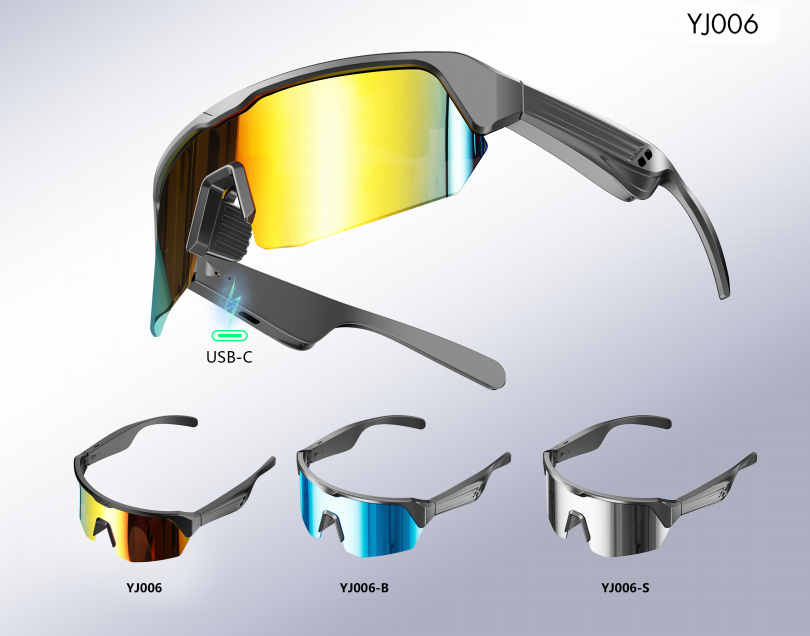
For a concrete comparison, the site lists YJ006 sport audio sunglasses with USB-C charging, while YJ005-A02 smart music sunglasses list magnetic charging. Those listings identify the advertised charging type; they do not establish compatibility between cables or prove a measured charge time. Confirm the accessory in the package before ordering a replacement. If the listing and the product label disagree, request the current manual and accessory part number from the seller.
A careful charging sequence
1. Stop playback and inspect the glasses
Pause a call, recording or music session so you can see whether the device enters charging mode. Check for a bent port, damaged lead, swollen or distorted frame, moisture or debris. Do not connect a visibly damaged battery product. If the glasses have been in rain, follow their own water-exposure instructions before charging. A water-resistance marketing claim does not make wet charging contacts safe.
2. Use the model’s specified accessory
For direct USB-C charging, use a standards-compliant cable and a compatible charger that meets the maker’s input requirements. For magnetic charging, use the intended lead and let the magnets align naturally; never force a reversed contact. For a case, fold or position the temples exactly as instructed and make sure the charging points meet. Ray-Ban’s official help specifically describes seating its glasses on the nose-bridge connection inside the case. That is an example for those models, not a rule for all glasses.
3. Check the indicator, then check again
An LED can signal case battery level, glasses charging status, pairing or an error depending on what action triggered it. Do not infer “charging” from color alone. Look up the LED table for your exact generation and note whether the case is open, closed or plugged in. On supported models, the companion app may show a separate battery percentage for the glasses and case. A rising percentage after several minutes is better evidence of charging than a single light flash.
4. Remove power when the product says it is charged
Use the app or product indicator described by the maker. Charging time depends on battery state, input rating, temperature and charging design. A 30-watt wall adapter does not force a small pair of glasses to take 30 watts; the device controls its accepted input. Avoid promising an exact recharge time unless the manufacturer specifies it for the same model and method. When the device reports full, unplug the cable or remove the case from external power as directed in its instructions.
Why charging may appear to fail
Start with reversible checks. A case can be empty even though the glasses are properly docked. A USB-C cable can be power-only, intermittent or damaged. Magnetic contacts can be misaligned by a folded temple. On an unfamiliar model, a red LED might mean low battery, error or charging; consult the manual rather than guessing. Keep cleaning conservative: disconnect power first, use a soft dry cloth where the maker permits and avoid scraping plated pins or spraying liquid into a port.
| Symptom | Likely checks | What not to assume | When to stop |
|---|---|---|---|
| No indicator at all | Outlet, adapter, cable, case charge, docking alignment | That the glasses battery has failed | Visible damage, overheating or odor |
| Indicator flashes but level does not rise | Contact seating, correct lead, app status after a short interval | That any flash means active charging | Repeated errors with approved accessories |
| Charging stops intermittently | Loose plug, dirty dry contacts, case closure | That a stronger charger solves a bad connection | Hot connector or damaged pins |
| Case charges, glasses do not | Glasses orientation and case contact area | That the case USB-C port feeds the glasses directly | After model-specific troubleshooting fails |
Ray-Ban’s official troubleshooting suggests checking case power, contacts, cable, charger and outlet for its own case-charged products. Google’s Glass Enterprise safety instructions warn against charging with incompatible accessories and against exposing the battery to water or extreme temperatures. Neither document gives a universal temperature limit or LED code for every audio sunglass. Apply the product’s own limits first.
Choosing a power source while traveling
A wall adapter, laptop port or power bank may all be usable if they supply the input specified by the manufacturer. Check the glasses’ input label and the charger’s output; do not choose on advertised wattage alone. A power bank can be useful away from an outlet, but it does not change the glasses’ charging design. If your glasses need a magnetic lead, you still need that lead. If they need a case, you still need the compatible case.
When flying, the charging case or portable charger may also contain a lithium battery. The U.S. Federal Aviation Administration classifies power banks as spare batteries and requires them in carry-on baggage, with capacity limits. This is separate from the question of how to charge the glasses. Check airline and destination rules for the battery you are carrying, especially if you are also bringing a large power bank. Do not place a loose cable or metal object across exposed charging contacts.
Buying checklist for an audio-glasses charging system
Before buying, confirm whether the advertised charging time refers to the glasses alone, a case, or both together. Ask whether the cable or case is included, whether replacements are sold and whether the device can operate while charging. Look for a clear input specification and a usable manual. If the listing shows a case but the specifications say magnetic charging, ask the seller to clarify the current version instead of inferring that both methods work.
For direct-charge options, compare the YJ006 listing with the separately listed YJ010 audio glasses; both describe USB-C charging but have different frames and controls. The product pages are selection starting points, not independent safety certificates or laboratory results. Ask for the final model sheet and compatible charging accessory before placing a bulk order.
FAQ
Can I charge smart glasses with a phone charger?
Possibly, if the glasses or their case accept that charger’s output and the maker allows the cable and adapter combination. Check the input specification. Connector shape alone is insufficient, and charging speed is controlled by the device. A magnetic-contact model needs its matching lead even when the power source is an ordinary USB adapter.
Why are the glasses not charging inside the case?
Check the case battery, orientation and contact alignment. Confirm that any protective film over new contacts was removed if the maker instructs it. Inspect for dry debris and consult the model’s indicator guide. If the case charges but the glasses still do not, follow the maker’s warranty process rather than opening the battery compartment.
Should I charge immediately after getting the glasses wet?
No. Disconnect power and follow the manufacturer’s water-exposure guidance. Even water-resistant products can have vulnerable charging contacts. Do not use heat, compressed air or a sharp object to accelerate drying unless the maker specifically instructs it. Seek support if the charging system behaves abnormally afterward.
Takeaway: A safe charge begins with the exact model and its intended accessory. Confirm charging with the correct indicator or app, inspect dry contacts and stop if there is heat, damage or a repeated error. That approach is more useful than a one-size-fits-all “plug it in” instruction.