Sometimes, but 10000mAh alone cannot answer the question. A laptop needs a compatible charging connection and enough output power; a 10000mAh battery also has a limited energy budget. A bank may charge a small USB-C laptop while it is off or lightly used, add only a small amount of runtime, or fail to charge a different laptop at all. To decide for a specific pairing, check three separate items: the laptop’s accepted USB-C power modes, the bank’s actual output profiles, and the bank’s rated energy in watt-hours (Wh).
First question: can the laptop accept the bank’s output?
Many modern laptops use USB-C charging, but the connector shape is not enough. The laptop’s charging port must support power input, and the bank must offer a voltage/current mode the laptop accepts. USB-IF’s USB Type-C guidance distinguishes the USB-C connector from USB Power Delivery. Its USB Power Delivery overview explains that source and device negotiate power. A printed “USB-C” icon therefore cannot confirm that a small power bank will charge a computer.
Look up the laptop manufacturer’s charger specification or USB-C charging documentation for the exact model. Record its recommended wattage and any supported lower-power modes. Then inspect the bank’s output profile, not its input rating or the wattage of the wall adapter used to refill the bank. A bank that outputs only a basic phone-charging mode may not be accepted by a laptop that expects higher USB PD voltages. Dell’s laptop power-accessory guidance likewise notes that a USB-C port does not automatically support charging and that not every USB-C charger can power a laptop. Apply the laptop maker’s own instructions to your exact device.
| Gate | What to verify | Why it matters |
|---|---|---|
| Laptop port | Does this exact laptop accept USB-C power input? | Some USB-C ports carry data or video without charging |
| Power profile | Do the bank and laptop share a supported voltage/current mode? | The connector alone does not create a suitable power contract |
| Cable | Is the cable suitable for the intended mode and undamaged? | A cable can limit or interrupt charging |
| Operating load | How much power is the laptop using during the test? | Light use and heavy work produce different net battery gains |
Second question: how much energy is available?
A 10000mAh figure usually refers to internal cell charge at a stated voltage, not to a guaranteed 10000mAh delivered at USB output. The FAA’s battery guidance shows the arithmetic for converting an actual battery rating: Wh = (mAh ÷ 1000) × V. A hypothetical 10000mAh bank explicitly rated at 3.7V stores 37Wh nominally. That is an illustration; a real product may have a different printed Wh rating. The usable energy delivered to a laptop will be less than nominal stored energy because the bank converts voltage and uses energy internally. The laptop’s own charging circuit also has losses.
Suppose, only as a planning example, that a particular 37Wh bank delivered 25Wh to the laptop through a compatible output. If the laptop used 10W during a light task, 25Wh could theoretically cover about 2.5 hours of that average load if all 25Wh served the running system. If it used 40W, the same energy would represent about 0.6 hours. These are unit conversions, not measured runtimes or predictions for the site’s products. In practice, the laptop may draw from its own battery at the same time, alter performance, or refuse the source. A battery percentage increase is the outcome to observe.
| Question | Illustrative answer | What it does not prove |
|---|---|---|
| How much energy is stored? | 10000mAh × 3.7V would equal 37Wh if that is the actual cell rating | Usable USB output Wh |
| How fast can it be delivered? | Bank’s documented USB-C output profile, if any | That every laptop accepts that profile |
| Can the laptop run while charging? | Depends on laptop load and accepted input | That its battery percentage will rise |
| How long will it extend use? | Measured usable Wh divided by observed average laptop W | An exact result from the mAh label alone |
Why a bank can show “charging” but add little battery
If the laptop accepts the connection but consumes nearly as much power as the bank supplies, its battery level may rise slowly or remain steady. Under a heavy workload, it may even fall while the bank is connected. The operating system’s charging icon does not by itself tell you the net energy entering the battery. Watch the battery percentage over a defined period with the same applications running, and note whether performance changes. Repeat when the laptop is asleep or off if the manufacturer permits that charging method. Never treat one short test at a nearly full laptop battery as a full discharge result.
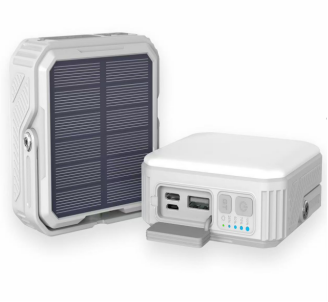
Also check whether the bank shares output between ports. A phone attached to a second port may reduce the power available to the laptop, depending on model. A product’s largest advertised wattage may apply only to one port when used alone. Ask for the multiport output table and the cable specification. A phone-oriented wireless charging coil does not imply laptop USB-C capability; those are separate systems. Likewise, a small solar panel on a bank is not evidence that it can replenish a laptop-sized energy demand during use.
What if your laptop uses a proprietary plug?
Do not improvise an adapter from a phone bank to a laptop’s barrel connector or proprietary input without manufacturer-approved specifications. Voltage, polarity and negotiation requirements matter. If the laptop maker provides a certified USB-C input path or approved power accessory, follow that documentation. Otherwise, choose a compatible power source designed for the laptop. The goal is not merely to make a connector fit; it is to provide the electrical conditions the computer expects.
Compare a 10000mAh and a larger bank honestly
The site offers a 10000mAh solar power bank and a 20000mAh power bank listed with 65W. These pages are useful starting points for asking different questions: how much energy each exact model stores, which port supplies USB PD, and what simultaneous output is available. The 65W number appears in a product listing, but this article does not claim verified compatibility with any laptop. The 10000mAh listing is not presented as laptop-capable without its current port specification. Request model-specific documentation before ordering.
A larger bank can offer more stored energy but may also be heavier and cost more. Capacity alone does not guarantee a higher compatible output. A smaller bank with the right USB PD profile may work for brief top-ups of a compatible laptop, while a larger bank with the wrong profile may still fail. Conversely, a laptop that requires sustained high power may make a 10000mAh pack a poor practical choice even if it initially connects. Decide whether the goal is emergency boot time, a short meeting, or several hours of off-grid work; these call for different energy budgets.
Five-minute pre-purchase check
- Find the exact laptop model’s supported charging inputs and power requirements.
- Read the bank’s printed Wh rating and per-port USB output modes.
- Confirm the cable can support the intended negotiated mode.
- Check the bank’s simultaneous-output rules if another device will be attached.
- Ask for a real test with the laptop model or return terms if compatibility is uncertain.
A 10000mAh bank can charge some laptops under compatible conditions, but the mAh figure is not a compatibility certificate or runtime promise. Start with the laptop’s input requirements, then the bank’s output profile, then the usable Wh. That order answers the buyer’s actual question without confusing capacity with power.