Jawaban cepat: Identify the exact glasses model and use its specified charging path. Some audio sunglasses accept a USB-C cable at the frame; others use a proprietary magnetic lead or a charging case. Charge the case separately if the maker says to. Do not assume a connector that fits is electrically or mechanically correct. If charging does not start, check the case battery, alignment, dry contacts, cable and adapter before attempting any reset.
"Kacamata Cerdas" mencakup beberapa desain dengan perangkat keras yang sangat berbeda. Itulah sebabnya instruksi pengisian daya universal tidak dapat diandalkan. Titik awal yang paling aman adalah nomor model yang tercetak pada kotak, pelipis, atau manual. Instruksi pabrikan saat ini lebih diprioritaskan daripada saran umum, terutama untuk warna LED, adaptor yang diizinkan, dan paparan air. Panduan ini menjelaskan cara mengidentifikasi metode pengisian, memastikan bahwa daya sebenarnya mengalir dan menangani masalah umum tanpa memperlakukan setiap pasangan sebagai kacamata meta Ray-Ban.
Pertama mengidentifikasi bagian mana yang menerima kekuatan
Ada tiga pengaturan luas. Bingkai USB-C langsung memiliki port pada kacamata; Bingkai kontak magnetik menggunakan kabel sejajar; dan bingkai bermuatan kasing menerima daya melalui kontak dalam kotak yang dipasang. Sebuah kasing sendiri dapat mengisi daya melalui USB-C sementara kacamata tidak memiliki port USB yang terbuka. Ray-Ban mengatakan kacamata metanya hanya diisi dalam kasus ini, sedangkan casingnya terhubung ke USB-C. Perbedaannya penting: mencolokkan kabel ke dalam casing bukanlah operasi yang sama dengan mengisi bingkai itu sendiri.
| desain pengisian | Apa yang harus ditemukan | Safe first check | Kesalahan umum |
|---|---|---|---|
| USB-C pada Bingkai | Pelabuhan di candi atau jembatan, sebagaimana diidentifikasi dalam Model Guide | Periksa port kering dan kursi kabel tanpa paksa | Menggunakan adaptor daya lebih tinggi sebagai bukti pengisian lebih cepat |
| Timbal magnetik | Pad kontak yang cocok dan timah yang disediakan | Verifikasi kedua pin menyelaraskan dan perubahan indikator | Menggunakan timah yang mirip secara visual dengan pengaturan pin yang berbeda |
| kasus pengisian | Kontak docking kacamata ditambah input case terpisah | Periksa baterai case dan tempat duduk yang benar | Dengan asumsi casing memiliki kekuatan karena LEDnya sebentar menyala |
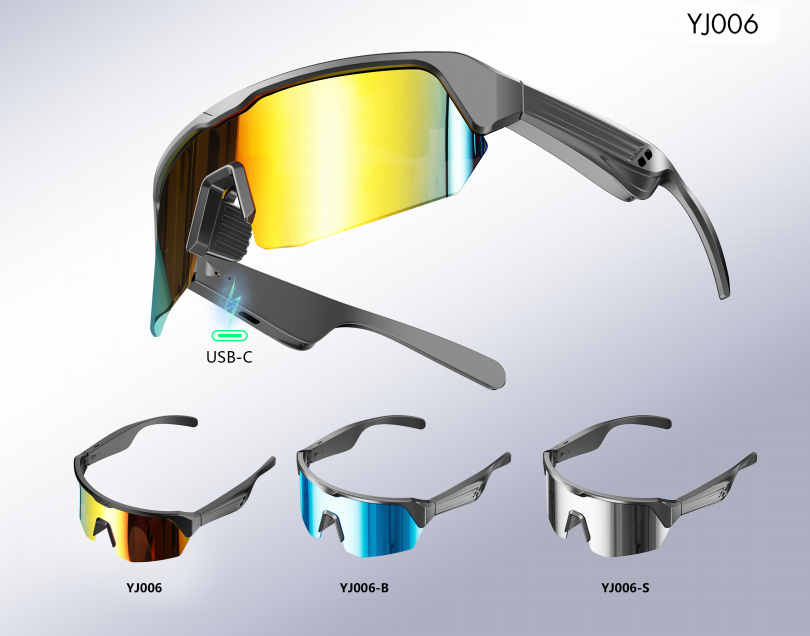
For a concrete comparison, the site lists YJ006 sport audio sunglasses with USB-C charging, while YJ005-A02 smart music sunglasses list magnetic charging. Those listings identify the advertised charging type; they do not establish compatibility between cables or prove a measured charge time. Confirm the accessory in the package before ordering a replacement. If the listing and the product label disagree, request the current manual and accessory part number from the seller.
urutan pengisian yang hati-hati
1. Stop playback and inspect the glasses
Pause a call, recording or music session so you can see whether the device enters charging mode. Check for a bent port, damaged lead, swollen or distorted frame, moisture or debris. Do not connect a visibly damaged battery product. If the glasses have been in rain, follow their own water-exposure instructions before charging. A water-resistance marketing claim does not make wet charging contacts safe.
2. Gunakan aksesori yang ditentukan model
For direct USB-C charging, use a standards-compliant cable and a compatible charger that meets the maker’s input requirements. For magnetic charging, use the intended lead and let the magnets align naturally; never force a reversed contact. For a case, fold or position the temples exactly as instructed and make sure the charging points meet. Ray-Ban’s official help specifically describes seating its glasses on the nose-bridge connection inside the case. That is an example for those models, not a rule for all glasses.
3. Periksa indikatornya, lalu periksa lagi
An LED can signal case battery level, glasses charging status, pairing or an error depending on what action triggered it. Do not infer “charging” from color alone. Look up the LED table for your exact generation and note whether the case is open, closed or plugged in. On supported models, the companion app may show a separate battery percentage for the glasses and case. A rising percentage after several minutes is better evidence of charging than a single light flash.
4. Hapus daya saat produk mengatakan diisi daya
Use the app or product indicator described by the maker. Charging time depends on battery state, input rating, temperature and charging design. A 30-watt wall adapter does not force a small pair of glasses to take 30 watts; the device controls its accepted input. Avoid promising an exact recharge time unless the manufacturer specifies it for the same model and method. When the device reports full, unplug the cable or remove the case from external power as directed in its instructions.
Mengapa pengisian daya mungkin tampak gagal
Mulailah dengan pemeriksaan reversibel. Sebuah kasing bisa kosong meskipun gelasnya terpasang dengan benar. Kabel USB-C dapat hanya bertenaga, terputus-putus atau rusak. Kontak magnetik dapat disejajarkan oleh kuil yang terlipat. Pada model yang tidak dikenal, LED merah mungkin berarti baterai rendah, kesalahan, atau pengisian daya; Konsultasikan manual daripada menebak. Tetap bersihkan konservatif: Lepaskan daya terlebih dahulu, gunakan kain kering yang lembut di mana pembuatnya mengizinkan dan hindari pin berlapis atau penyemprotan cairan ke dalam port.
| Gejala | Kemungkinan cek | Apa yang tidak boleh diasumsikan? | When to stop |
|---|---|---|---|
| Tidak ada indikator sama sekali | Outlet, Adaptor, Kabel, Case Charge, Docking Alignment | bahwa baterai kacamata telah gagal | Visible damage, overheating or odor |
| Indikator berkedip tetapi level tidak naik | Tempat duduk kontak, prospek yang benar, status aplikasi setelah interval pendek | bahwa flash apa pun berarti pengisian daya aktif | Kesalahan berulang dengan aksesori yang disetujui |
| Pengisian berhenti sebentar-sebentar | Steker longgar, kontak kering kotor, penutupan case | bahwa pengisi daya yang lebih kuat memecahkan koneksi yang buruk | Konektor panas atau pin rusak |
| Case charges, glasses do not | Orientasi kacamata dan area kontak case | bahwa port USB-C casing memberi makan kacamata secara langsung | Setelah pemecahan masalah khusus model gagal |
Ray-Ban’s official troubleshooting suggests checking case power, contacts, cable, charger and outlet for its own case-charged products. Google’s Glass Enterprise safety instructions warn against charging with incompatible accessories and against exposing the battery to water or extreme temperatures. Neither document gives a universal temperature limit or LED code for every audio sunglass. Apply the product’s own limits first.
Memilih Sumber Daya Saat Bepergian
A wall adapter, laptop port or power bank may all be usable if they supply the input specified by the manufacturer. Check the glasses’ input label and the charger’s output; do not choose on advertised wattage alone. A power bank can be useful away from an outlet, but it does not change the glasses’ charging design. If your glasses need a magnetic lead, you still need that lead. If they need a case, you still need the compatible case.
When flying, the charging case or portable charger may also contain a lithium battery. The U.S. Federal Aviation Administration classifies power banks as spare batteries and requires them in carry-on baggage, with capacity limits. This is separate from the question of how to charge the glasses. Check airline and destination rules for the battery you are carrying, especially if you are also bringing a large power bank. Do not place a loose cable or metal object across exposed charging contacts.
Membeli daftar periksa untuk sistem pengisian kacamata audio
Sebelum membeli, konfirmasikan apakah waktu pengisian yang diiklankan mengacu pada kacamata saja, kasing, atau keduanya bersama-sama. Tanyakan apakah kabel atau kasing disertakan, apakah penggantian dijual dan apakah perangkat dapat beroperasi saat mengisi daya. Carilah spesifikasi input yang jelas dan manual yang dapat digunakan. Jika daftar menunjukkan kasus tetapi spesifikasi mengatakan pengisian magnetik, minta penjual untuk mengklarifikasi versi saat ini alih-alih menyimpulkan bahwa kedua metode berfungsi.
For direct-charge options, compare the YJ006 listing with the separately listed Kacamata Audio YJ010; both describe USB-C charging but have different frames and controls. The product pages are selection starting points, not independent safety certificates or laboratory results. Ask for the final model sheet and compatible charging accessory before placing a bulk order.
FAQ
Bisakah saya mengisi kacamata pintar dengan pengisi daya telepon?
Mungkin, jika kacamata atau kasingnya menerima keluaran pengisi daya dan pembuatnya memungkinkan kombinasi kabel dan adaptor. Periksa spesifikasi input. Bentuk konektor saja tidak mencukupi, dan kecepatan pengisian dikontrol oleh perangkat. Model kontak magnetik membutuhkan kabel yang cocok bahkan ketika sumber dayanya adalah adaptor USB biasa.
Mengapa kacamata tidak mengisi daya di dalam casing?
Check the case battery, orientation and contact alignment. Confirm that any protective film over new contacts was removed if the maker instructs it. Inspect for dry debris and consult the model’s indicator guide. If the case charges but the glasses still do not, follow the maker’s warranty process rather than opening the battery compartment.
Haruskah saya mengisi daya segera setelah kacamata basah?
No. Disconnect power and follow the manufacturer’s water-exposure guidance. Even water-resistant products can have vulnerable charging contacts. Do not use heat, compressed air or a sharp object to accelerate drying unless the maker specifically instructs it. Seek support if the charging system behaves abnormally afterward.
Takeaway: A safe charge begins with the exact model and its intended accessory. Confirm charging with the correct indicator or app, inspect dry contacts and stop if there is heat, damage or a repeated error. That approach is more useful than a one-size-fits-all “plug it in” instruction.