Risposta rapida: Identify the exact glasses model and use its specified charging path. Some audio sunglasses accept a USB-C cable at the frame; others use a proprietary magnetic lead or a charging case. Charge the case separately if the maker says to. Do not assume a connector that fits is electrically or mechanically correct. If charging does not start, check the case battery, alignment, dry contacts, cable and adapter before attempting any reset.
"Occhiali intelligenti" copre diversi design con hardware molto diverso. Ecco perché un'istruzione di ricarica universale è inaffidabile. Il punto di partenza più sicuro è il numero di modello stampato sulla scatola, sul tempio o sul manuale. Le attuali istruzioni del produttore hanno la priorità sui consigli generici, in particolare per i colori a LED, gli adattatori consentiti e l'esposizione all'acqua. Questa guida spiega come identificare il metodo di ricarica, confermare che l'alimentazione scorre effettivamente e gestire i problemi comuni senza trattare ogni coppia come meta occhiali Ray-Ban.
Per prima cosa identificare quale parte riceve il potere
Ci sono tre ampie disposizioni. Una montatura diretta USB-C ha una porta sugli occhiali; Un telaio a contatto magnetico utilizza un cavo allineato; E un telaio a custodia riceve potenza attraverso i contatti in una custodia montata. Una custodia potrebbe caricarsi tramite USB-C mentre gli occhiali non hanno una porta USB esposta. Ray-Ban afferma che i suoi meta occhiali si ricaricano solo nel caso, mentre la sua custodia si collega a USB-C. La differenza è importante: collegare un cavo alla custodia non è la stessa operazione di caricare i telai stessi.
| Disegno di ricarica | Cosa individuare | Safe first check | Errore comune |
|---|---|---|---|
| USB-C sul telaio | Porto sul tempio o sul ponte, come identificato nella guida del modello | La porta di controllo è asciutta e i sedili dei cavi senza forza | Utilizzo di un adattatore di alimentazione superiore come prova di ricarica più veloce |
| Piombo magnetico | Tampone di contatto abbinato e piombo in dotazione | Verificare che entrambi i pin si allineano e le modifiche degli indicatori | utilizzando un piombo visivamente simile con una disposizione dei pin diversa |
| Custodia di ricarica | Occhiali Docking Contatti più Input di custodia separata | Controllare la batteria della custodia e la posizione corretta | Supponendo che il case abbia potenza perché il suo LED si accende brevemente |
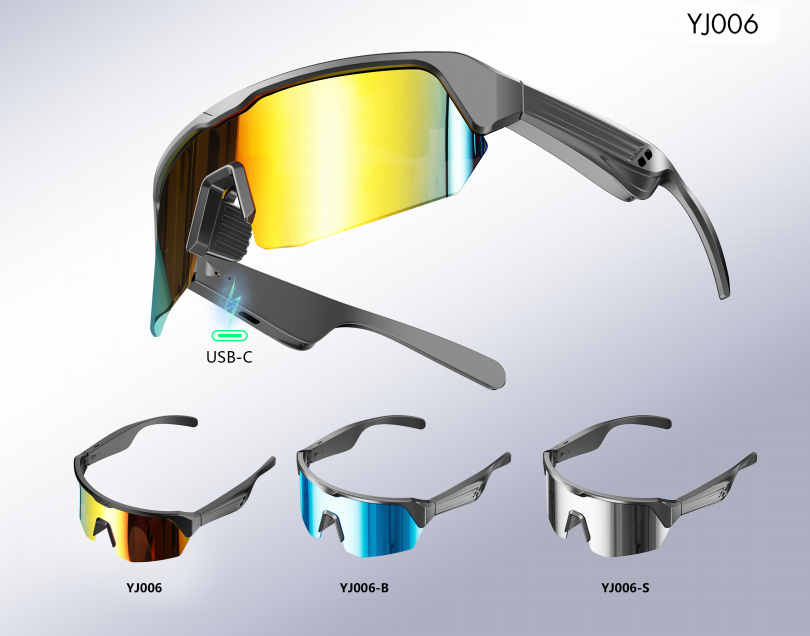
For a concrete comparison, the site lists YJ006 sport audio sunglasses with USB-C charging, while YJ005-A02 smart music sunglasses list magnetic charging. Those listings identify the advertised charging type; they do not establish compatibility between cables or prove a measured charge time. Confirm the accessory in the package before ordering a replacement. If the listing and the product label disagree, request the current manual and accessory part number from the seller.
un'attenta sequenza di ricarica
1. Stop playback and inspect the glasses
Pause a call, recording or music session so you can see whether the device enters charging mode. Check for a bent port, damaged lead, swollen or distorted frame, moisture or debris. Do not connect a visibly damaged battery product. If the glasses have been in rain, follow their own water-exposure instructions before charging. A water-resistance marketing claim does not make wet charging contacts safe.
2. Utilizzare l'accessorio specificato del modello
For direct USB-C charging, use a standards-compliant cable and a compatible charger that meets the maker’s input requirements. For magnetic charging, use the intended lead and let the magnets align naturally; never force a reversed contact. For a case, fold or position the temples exactly as instructed and make sure the charging points meet. Ray-Ban’s official help specifically describes seating its glasses on the nose-bridge connection inside the case. That is an example for those models, not a rule for all glasses.
3. Controllare l'indicatore, quindi controllare di nuovo
An LED can signal case battery level, glasses charging status, pairing or an error depending on what action triggered it. Do not infer “charging” from color alone. Look up the LED table for your exact generation and note whether the case is open, closed or plugged in. On supported models, the companion app may show a separate battery percentage for the glasses and case. A rising percentage after several minutes is better evidence of charging than a single light flash.
4. Rimuovere l'alimentazione quando il prodotto dice che è carico
Use the app or product indicator described by the maker. Charging time depends on battery state, input rating, temperature and charging design. A 30-watt wall adapter does not force a small pair of glasses to take 30 watts; the device controls its accepted input. Avoid promising an exact recharge time unless the manufacturer specifies it for the same model and method. When the device reports full, unplug the cable or remove the case from external power as directed in its instructions.
Perché la ricarica potrebbe sembrare fallire
Inizia con controlli reversibili. Una custodia può essere vuota anche se gli occhiali sono adeguatamente ancorati. Un cavo USB-C può essere di sola alimentazione, intermittente o danneggiato. I contatti magnetici possono essere disallineati da una tempia piegata. Su un modello sconosciuto, un LED rosso potrebbe significare batteria scarica, errori o ricarica; Consulta il manuale invece di indovinare. Mantieni la pulizia conservativa: scollegare prima l'alimentazione, utilizzare un panno morbido e asciutto dove il produttore lo consente ed evitare di raschiare i perni placcati o spruzzare il liquido in una porta.
| Sintomo | Probabili controlli | Cosa non dare per scontato | When to stop |
|---|---|---|---|
| nessun indicatore a tutti | Presa, Adattatore, Cavo, Carica Cassa, Allineamento Docking | che la batteria degli occhiali è guasta | Visible damage, overheating or odor |
| L'indicatore lampeggia ma il livello non sale | Sedute di contatto, cavo corretto, stato dell'app dopo un breve intervallo | che qualsiasi flash significa ricarica attiva | Errori ripetuti con accessori approvati |
| La ricarica si interrompe a intermittenza | Tappo allentato, contatti asciutti sporchi, chiusura della cassa | che un caricabatterie più forte risolve una cattiva connessione | Connettore caldo o pin danneggiati |
| Case charges, glasses do not | Orientamento degli occhiali e area di contatto della cassa | che la porta USB-C della custodia alimenta direttamente gli occhiali | Dopo che la risoluzione dei problemi specifici del modello non riesce |
Ray-Ban’s official troubleshooting suggests checking case power, contacts, cable, charger and outlet for its own case-charged products. Google’s Glass Enterprise safety instructions warn against charging with incompatible accessories and against exposing the battery to water or extreme temperatures. Neither document gives a universal temperature limit or LED code for every audio sunglass. Apply the product’s own limits first.
Scegliere una fonte di alimentazione durante il viaggio
A wall adapter, laptop port or power bank may all be usable if they supply the input specified by the manufacturer. Check the glasses’ input label and the charger’s output; do not choose on advertised wattage alone. A power bank can be useful away from an outlet, but it does not change the glasses’ charging design. If your glasses need a magnetic lead, you still need that lead. If they need a case, you still need the compatible case.
When flying, the charging case or portable charger may also contain a lithium battery. The U.S. Federal Aviation Administration classifies power banks as spare batteries and requires them in carry-on baggage, with capacity limits. This is separate from the question of how to charge the glasses. Check airline and destination rules for the battery you are carrying, especially if you are also bringing a large power bank. Do not place a loose cable or metal object across exposed charging contacts.
Lista di controllo per l'acquisto di un sistema di ricarica per occhiali audio
Prima di acquistare, conferma se il tempo di ricarica pubblicizzato si riferisce solo agli occhiali, a una custodia o entrambi insieme. Chiedi se il cavo o la custodia sono inclusi, se le sostituzioni vengono vendute e se il dispositivo può funzionare durante la ricarica. Cerca una specifica di input chiara e un manuale utilizzabile. Se l'elenco mostra un caso ma le specifiche dicono carica magnetica, chiedi al venditore di chiarire la versione corrente invece di dedurre che entrambi i metodi funzionino.
For direct-charge options, compare the YJ006 listing with the separately listed YJ010 Occhiali audio; both describe USB-C charging but have different frames and controls. The product pages are selection starting points, not independent safety certificates or laboratory results. Ask for the final model sheet and compatible charging accessory before placing a bulk order.
FAQ
Posso caricare gli occhiali intelligenti con un caricabatterie per telefono?
Possibilmente, se gli occhiali o la loro custodia accettano l'uscita del caricabatterie e il produttore consente la combinazione di cavi e adattatore. Controllare la specifica di input. La sola forma del connettore è insufficiente e la velocità di ricarica è controllata dal dispositivo. Un modello a contatto magnetico ha bisogno del suo cavo corrispondente anche quando la fonte di alimentazione è un normale adattatore USB.
Perché gli occhiali non si caricano all'interno della custodia?
Check the case battery, orientation and contact alignment. Confirm that any protective film over new contacts was removed if the maker instructs it. Inspect for dry debris and consult the model’s indicator guide. If the case charges but the glasses still do not, follow the maker’s warranty process rather than opening the battery compartment.
Devo caricare subito dopo aver bagnato gli occhiali?
No. Disconnect power and follow the manufacturer’s water-exposure guidance. Even water-resistant products can have vulnerable charging contacts. Do not use heat, compressed air or a sharp object to accelerate drying unless the maker specifically instructs it. Seek support if the charging system behaves abnormally afterward.
Takeaway: A safe charge begins with the exact model and its intended accessory. Confirm charging with the correct indicator or app, inspect dry contacts and stop if there is heat, damage or a repeated error. That approach is more useful than a one-size-fits-all “plug it in” instruction.