簡単な答え: Identify the exact glasses model and use its specified charging path. Some audio sunglasses accept a USB-C cable at the frame; others use a proprietary magnetic lead or a charging case. Charge the case separately if the maker says to. Do not assume a connector that fits is electrically or mechanically correct. If charging does not start, check the case battery, alignment, dry contacts, cable and adapter before attempting any reset.
「スマート グラス」は、さまざまなハードウェアを備えたいくつかのデザインをカバーしています。 そのため、ユニバーサル充電命令は信頼できません。 最も安全な出発点は、箱、テンプル、またはマニュアルに印刷されたモデル番号です。 製造元の現在の指示は、特に LED カラー、許可されたアダプター、および水への露出に関して、一般的なアドバイスよりも優先されます。 このガイドでは、充電方法を特定し、電力が実際に流れていることを確認し、すべてのペアをレイバン メタ グラスとして扱うことなく、一般的な問題を処理する方法について説明します。
まず、どの部分が電力を受け取るかを特定します
There are three broad arrangements. A direct USB-C frame has a port on the glasses; a magnetic-contact frame uses an aligned cable; and a case-charged frame receives power through contacts in a fitted case. A case may itself charge through USB-C while the glasses have no exposed USB port. Ray-Ban says its Meta glasses charge only in the case, whereas its case connects to USB-C. The difference matters: plugging a cable into the case is not the same operation as charging the frames themselves.
| 充電設計 | 何を見つけるか | Safe first check | よくある間違い |
|---|---|---|---|
| USB-C オン フレーム | モデル ガイドで識別される、テンプルまたはブリッジの港 | チェック ポートはドライで、ケーブル シートは力を入れません | より高速な充電の証明として、より高電力のアダプターを使用します |
| 磁気リード | コンタクト パッドと付属のリードが一致しています | 両方のピンが整列し、インジケータが変更されていることを確認します | 異なるピン配置で視覚的に類似したリードを使用する |
| 充電ケース | メガネ ドッキング コンタクトと個別のケース入力 | ケースのバッテリーと正しい座席を確認してください | LED が短時間点灯するため、ケースに電源が入っていると仮定します。 |
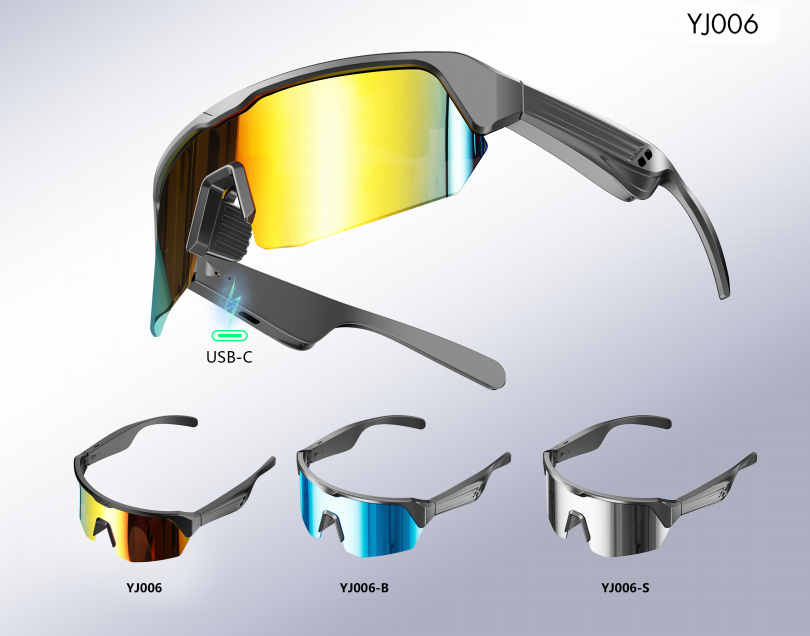
For a concrete comparison, the site lists YJ006 sport audio sunglasses with USB-C charging, while YJ005-A02 smart music sunglasses list magnetic charging. Those listings identify the advertised charging type; they do not establish compatibility between cables or prove a measured charge time. Confirm the accessory in the package before ordering a replacement. If the listing and the product label disagree, request the current manual and accessory part number from the seller.
慎重な充電シーケンス
1. Stop playback and inspect the glasses
Pause a call, recording or music session so you can see whether the device enters charging mode. Check for a bent port, damaged lead, swollen or distorted frame, moisture or debris. Do not connect a visibly damaged battery product. If the glasses have been in rain, follow their own water-exposure instructions before charging. A water-resistance marketing claim does not make wet charging contacts safe.
2. モデルの指定されたアクセサリを使用します
For direct USB-C charging, use a standards-compliant cable and a compatible charger that meets the maker’s input requirements. For magnetic charging, use the intended lead and let the magnets align naturally; never force a reversed contact. For a case, fold or position the temples exactly as instructed and make sure the charging points meet. Ray-Ban’s official help specifically describes seating its glasses on the nose-bridge connection inside the case. That is an example for those models, not a rule for all glasses.
3. インジケーターをチェックしてから、もう一度確認します
An LED can signal case battery level, glasses charging status, pairing or an error depending on what action triggered it. Do not infer “charging” from color alone. Look up the LED table for your exact generation and note whether the case is open, closed or plugged in. On supported models, the companion app may show a separate battery percentage for the glasses and case. A rising percentage after several minutes is better evidence of charging than a single light flash.
4. 製品が充電されていると表示されたら、電源を切ってください。
Use the app or product indicator described by the maker. Charging time depends on battery state, input rating, temperature and charging design. A 30-watt wall adapter does not force a small pair of glasses to take 30 watts; the device controls its accepted input. Avoid promising an exact recharge time unless the manufacturer specifies it for the same model and method. When the device reports full, unplug the cable or remove the case from external power as directed in its instructions.
なぜ充電に失敗するのか
リバーシブル チェックから始めます。 メガネが適切にドッキングされていても、ケースは空になる可能性があります。 USB-C ケーブルは、電源のみ、断続的、または破損する可能性があります。 折り畳まれたテンプルによって磁気コンタクトがずれている可能性があります。 なじみのないモデルでは、赤色の LED は、バッテリーの低下、エラー、または充電を意味する場合があります。 推測ではなく、マニュアルを参照してください。 保守的な清掃を維持する: 最初に電源を切り、メーカーが許すところにある柔らかい乾いた布を使用し、メッキのピンをこすり落としたり、液体をポートに吹き付けたりしないでください。
| 症状 | おそらくチェックします | 何を想定してはいけません | When to stop |
|---|---|---|---|
| インジケーターはまったくありません | アウトレット、アダプター、ケーブル、ケース充電、ドッキング アライメント | メガネのバッテリーが故障したこと | Visible damage, overheating or odor |
| インジケータが点滅しますが、レベルは上昇しません | コンタクト シート、正しいリード、短い間隔でアプリ ステータス | フラッシュはアクティブ充電を意味します | 承認されたアクセサリでのエラーの繰り返し |
| 充電が断続的に停止します | プラグの緩み、汚れた乾いた接点、ケースの閉鎖 | より強力な充電器が悪い接続を解決すること | ホット コネクタまたは破損したピン |
| Case charges, glasses do not | メガネの向きとケースのコンタクト エリア | ケース USB-C ポートがメガネに直接給電すること | モデル固有のトラブルシューティングが失敗した後 |
Ray-Ban’s official troubleshooting suggests checking case power, contacts, cable, charger and outlet for its own case-charged products. Google’s Glass Enterprise safety instructions warn against charging with incompatible accessories and against exposing the battery to water or extreme temperatures. Neither document gives a universal temperature limit or LED code for every audio sunglass. Apply the product’s own limits first.
旅行中の電源の選択
A wall adapter, laptop port or power bank may all be usable if they supply the input specified by the manufacturer. Check the glasses’ input label and the charger’s output; do not choose on advertised wattage alone. A power bank can be useful away from an outlet, but it does not change the glasses’ charging design. If your glasses need a magnetic lead, you still need that lead. If they need a case, you still need the compatible case.
When flying, the charging case or portable charger may also contain a lithium battery. The U.S. Federal Aviation Administration classifies power banks as spare batteries and requires them in carry-on baggage, with capacity limits. This is separate from the question of how to charge the glasses. Check airline and destination rules for the battery you are carrying, especially if you are also bringing a large power bank. Do not place a loose cable or metal object across exposed charging contacts.
オーディオメガネ充電システムのチェックリストを購入する
購入する前に、宣伝されている充電時間がメガネのみ、ケース、またはその両方を参照しているかどうかを確認してください。 ケーブルまたはケースが含まれているかどうか、交換品が販売されているかどうか、充電中にデバイスが動作できるかどうかを尋ねます。 明確な入力仕様と使用可能なマニュアルを探してください。 リストにケースが表示されているが、仕様に磁気充電と表示されている場合は、両方の方法が機能すると推測するのではなく、現在のバージョンを明確にするよう販売者に依頼してください。
For direct-charge options, compare the YJ006 listing with the separately listed YJ010 audio glasses; both describe USB-C charging but have different frames and controls. The product pages are selection starting points, not independent safety certificates or laboratory results. Ask for the final model sheet and compatible charging accessory before placing a bulk order.
よくある質問
スマートフォンの充電器でスマート グラスを充電できますか?
おそらく、眼鏡またはそのケースがその充電器の出力を受け入れ、メーカーがケーブルとアダプターの組み合わせを許可する場合。 入力仕様を確認してください。 コネクタの形状だけでは不十分であり、デバイスによって充電速度を制御します。 磁気コンタクト モデルは、電源が通常の USB アダプターであっても、一致するリードを必要とします。
ケース内でメガネが充電されないのはなぜですか?
Check the case battery, orientation and contact alignment. Confirm that any protective film over new contacts was removed if the maker instructs it. Inspect for dry debris and consult the model’s indicator guide. If the case charges but the glasses still do not, follow the maker’s warranty process rather than opening the battery compartment.
メガネを濡らしたらすぐに充電する必要がありますか?
No. Disconnect power and follow the manufacturer’s water-exposure guidance. Even water-resistant products can have vulnerable charging contacts. Do not use heat, compressed air or a sharp object to accelerate drying unless the maker specifically instructs it. Seek support if the charging system behaves abnormally afterward.
Takeaway: A safe charge begins with the exact model and its intended accessory. Confirm charging with the correct indicator or app, inspect dry contacts and stop if there is heat, damage or a repeated error. That approach is more useful than a one-size-fits-all “plug it in” instruction.